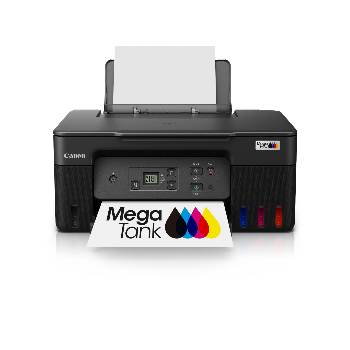
PIXMA G3770 High-Speed Wi-Fi All-in-One Printer

The PIXMA G3770 printer offers fast, high-quality, low-cost printing for home and office. With refillable ink tanks and wireless connectivity, this pixma g3770 ensures reliable performance for documents, photos, and everyday use.


₹ 20270 0% off
₹ 0

The PIXMA G3770 is a high-efficiency, refillable ink tank printer designed for users who need dependable, low-cost printing every day. Ideal for students, home offices, and small businesses, it delivers sharp documents and vibrant photos while keeping running costs under control. Integrated Wi-Fi makes it easy to print and scan from laptops, mobiles, and tablets using smart apps. Simple front-facing ink tanks allow easy monitoring and refilling, while the compact design saves desk space. The PIXMA G3770 supports borderless photo printing and multiple page sizes for versatile use. Available conveniently from Laxmi Narayan Estate, Beside Punjab National Bank, Rewa Road,Satna, it suits anyone seeking long-lasting ink, smooth operation, and consistent quality.

Refillable ink tanks for ultra-low printing costs
High page yield ideal for heavy home or office use
Built-in Wi-Fi for easy mobile and laptop printing
All-in-one print, scan, copy convenience
Sharp text and vibrant borderless photo printing
Simple ink monitoring with transparent front tanks

Unbox the PIXMA G3770 and remove all protective tapes. Fill the ink tanks with genuine pixma g3770 ink bottles as indicated. Connect the printer to power and turn it on. Install the pixma g3770 driver from the CD or official website. Use the Wi-Fi button to connect to your router, then add the printer on your PC or mobile using the recommended Canon app. Load paper in the tray, select your document or photo, and press print. Refill ink when levels are low and run cleaning from settings if print quality drops.

To install the Canon PIXMA G3770, first fill the ink tanks with the supplied bottles and load paper. Connect the printer to power and turn it on. Then install the pixma g3770 driver from the included CD or Canon’s website, and follow on-screen instructions to complete USB or Wi-Fi setup.

To connect to a PIXMA printer like the pixma g3770, press the Wi-Fi button until the light flashes, then use your router’s WPS button or enter the network details via the setup software. On your computer or phone, add the printer in settings or through the Canon PRINT app for wireless printing.

To use the PIXMA G3770, keep genuine pixma g3770 ink filled to recommended levels, load the correct paper type, and choose suitable print quality in settings. Use draft mode for everyday documents, higher quality for photos, and run nozzle cleaning if prints fade. Regularly print a test page to prevent ink clogging.

Canon PIXMA G3770 is considered very good for home and small office users thanks to its refillable ink tanks, low running cost, and Wi-Fi connectivity. Many canon pixma g3770 review highlights praise its page yield and print quality, making it ideal if you’re comparing pixma g3770 price versus long-term savings.

Yes, the Canon PIXMA G3770 is an all-in-one printer with a flatbed scanner and copier built in. You can scan documents and photos directly to your computer or mobile using the pixma g3770 driver software or Canon app, making it useful for study, office paperwork, and digital archiving.