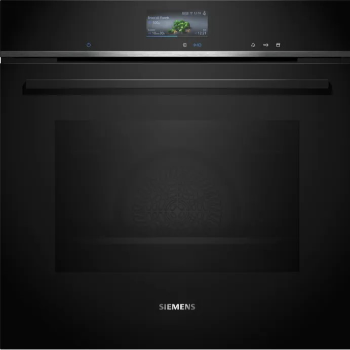
Siemens HS736G3B1I CookControl Pro Built In Oven
* CookControl Pro – Excellent results, whatever the recipe or circumstances. * Oven Assistant with Voice Control – Intuitively set the right programme. * Cut down on oven cleaning – ecoClean. * HumidClean Plus - For fast cleaning dirt is softened beforehand by vaporizing soapy water.
₹324,990
₹341,990
5% OFF
Product Details
The Siemens HS736G3B1I built in oven is designed for home cooks who demand precision, convenience and premium performance. CookControl Pro intelligently adjusts settings for reliable results, while the smart Oven Assistant with voice control helps you choose the right programme effortlessly for each dish. ecoClean and HumidClean Plus reduce scrubbing by breaking down grease and softening baked-on food. Multiple heating modes and intuitive Siemens oven settings make everything from roasts to bakes easier. Its sleek built-in design integrates seamlessly into modern modular kitchens and premium cabinetry. Available from 14, Sun industrial estate, Sun mill compound, Lower Parel west, Mumbai, Maharashtra 400013, India, this oven is ideal for busy families and serious food lovers.
Features & Benefits
CookControl Pro ensures reliable results for every recipe
Oven Assistant with voice control simplifies programme selection
ecoClean coating reduces oven cleaning effort significantly
HumidClean Plus softens dirt with steam for easy wiping
Intuitive Siemens oven settings suit baking, roasting and grilling
Built in design saves space and enhances modern kitchens
Oven Assistant with voice control simplifies programme selection
ecoClean coating reduces oven cleaning effort significantly
HumidClean Plus softens dirt with steam for easy wiping
Intuitive Siemens oven settings suit baking, roasting and grilling
Built in design saves space and enhances modern kitchens
How to Use
Install the Siemens HS736G3B1I as per the user manual, ensuring proper electrical connection and ventilation. Press the power button, then use the control knob or touch display to select your desired heating mode and temperature. For guided cooking, activate Oven Assistant and follow prompts. After cooking, allow the oven to cool, then run ecoClean or HumidClean Plus by adding a little soapy water, starting the programme, and wiping the cavity once the cycle finishes.
The Siemens built in oven HS736G3B1I combines CookControl Pro automatic programmes with an Oven Assistant and voice control, making it easy to select the ideal settings. It also offers ecoClean and HumidClean Plus for low‑effort cleaning, multiple heating modes, and a sleek built in design that fits modern modular kitchens.
Siemens ovens are produced in several high‑tech factories across Europe and other regions, following strict German engineering and quality standards. Exact origin may vary by model, but all Siemens built in ovens, including the HS736G3B1I, undergo rigorous testing for safety, durability, and performance before reaching customers.
On many Siemens ovens, the pizza setting uses bottom heat with fan or special pizza mode to deliver a crisp base and evenly melted toppings. You typically select it via the function dial or touch display, then set temperature and time according to the user manual or your recipe’s instructions.
Siemens built in oven symbols represent functions like conventional heat, hot air, grill, pizza mode, defrost, and cleaning cycles. Each icon indicates where heat comes from and whether a fan is used. Refer to the HS736G3B1I manual’s symbol chart for clear explanations of each function and recommended uses.
To turn on a Siemens oven, ensure it’s correctly installed and powered. Press the main On/Off key, then use the rotary knob or touch controls to choose a heating mode and temperature. For the HS736G3B1I, you can also use Oven Assistant, which guides you step by step through programme selection on the display.


 Select Date
 08:00 AM - 08:30 AM, Thursday, Nov 24, 2024
 Indian Standard Time
 Shahanab