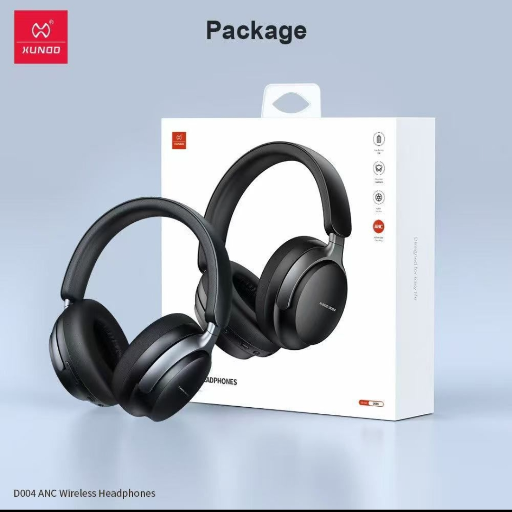
XUNDD WIRELESS HEADPHONES -ANC
Elevate your listening experience with XUNDD Wireless Headphones -ANC, offering superior sound quality and active noise cancellation for immersive music sessions.
₹4,999
Product Details
XUNDD Wireless Headphones -ANC are designed to deliver exceptional sound clarity and immersive audio experiences. With advanced active noise cancellation technology, these headphones block out unwanted background noise, allowing you to focus on your music or calls. The comfortable over-ear design and long-lasting battery life make them ideal for long listening sessions or travel. Connect effortlessly via Bluetooth and enjoy the ultimate wireless freedom with XUNDD.
Features & Benefits
- Advanced Active Noise Cancellation technology
- High-quality sound with superior clarity
- Comfortable over-ear design for extended wear
- Long-lasting battery life for uninterrupted listening
- Bluetooth connectivity for wireless convenience
- Built-in microphone for hands-free calls
The XUNDD Wireless Headphones -ANC provide a premium listening experience by blocking out distractions and focusing on crystal-clear sound. Whether you're enjoying music, podcasts, or taking calls, these headphones offer unmatched comfort and convenience. The long battery life ensures uninterrupted listening, while the wireless design allows for hassle-free use on the go.
- High-quality sound with superior clarity
- Comfortable over-ear design for extended wear
- Long-lasting battery life for uninterrupted listening
- Bluetooth connectivity for wireless convenience
- Built-in microphone for hands-free calls
The XUNDD Wireless Headphones -ANC provide a premium listening experience by blocking out distractions and focusing on crystal-clear sound. Whether you're enjoying music, podcasts, or taking calls, these headphones offer unmatched comfort and convenience. The long battery life ensures uninterrupted listening, while the wireless design allows for hassle-free use on the go.
How to Use
- To use the XUNDD Wireless Headphones -ANC, first make sure they are fully charged.
- Turn on the headphones by pressing and holding the power button until the LED light flashes.
- Activate Bluetooth on your device and search for the headphones to pair them.
- Once connected, adjust the volume, play/pause music, or answer calls using the control buttons on the headphones.
- To enable active noise cancellation, press the ANC button on the headphones.
- For optimal performance, store the headphones in a clean, dry place when not in use and avoid exposing them to extreme temperatures.
Keywords: wireless headphones, active noise cancellation, Bluetooth connectivity, premium sound quality, long-lasting battery life, over-ear design.
- Turn on the headphones by pressing and holding the power button until the LED light flashes.
- Activate Bluetooth on your device and search for the headphones to pair them.
- Once connected, adjust the volume, play/pause music, or answer calls using the control buttons on the headphones.
- To enable active noise cancellation, press the ANC button on the headphones.
- For optimal performance, store the headphones in a clean, dry place when not in use and avoid exposing them to extreme temperatures.
Keywords: wireless headphones, active noise cancellation, Bluetooth connectivity, premium sound quality, long-lasting battery life, over-ear design.


 Select Date
 08:00 AM - 08:30 AM, Thursday, Nov 24, 2024
 Indian Standard Time
 Shahanab