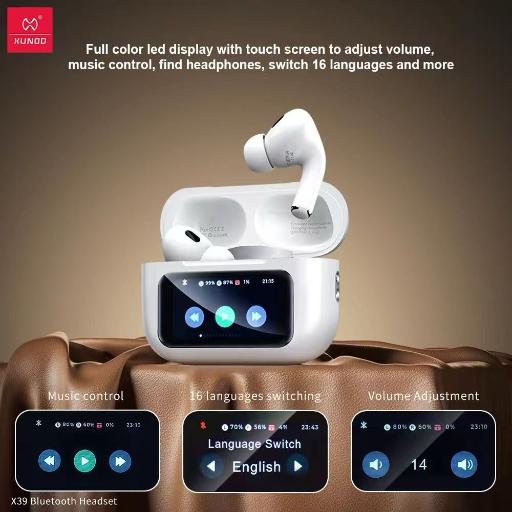
XUNDD X39 Airport 2 Pro ANC Bluetooth Headphones with LED Display
Elevate your audio experience with the XUNDD X39 LED DISPLAY CTO C AIRPORT 2 PRO ANC Bluetooth headphones, designed for premium sound quality and active noise cancellation.
₹4,999
Product Details
The XUNDD X39 LED DISPLAY CTO C AIRPORT 2 PRO ANC Bluetooth headphones are engineered to deliver an immersive audio experience like no other. With cutting-edge technology and advanced features, these headphones provide crystal-clear sound and unparalleled noise cancellation for ultimate listening pleasure. The sleek design and comfortable fit make them perfect for long listening sessions, whether you're on the go or relaxing at home. Stay connected wirelessly with Bluetooth connectivity and enjoy the convenience of hands-free calling. Take your audio experience to the next level with the XUNDD X39 LED DISPLAY CTO C AIRPORT 2 PRO ANC Bluetooth headphones.
Features & Benefits
- LED display for battery status and pairing information
- Active noise cancellation technology for uninterrupted listening
- Bluetooth connectivity for wireless streaming
- Comfortable fit for extended wear
- High-quality materials for durability
- Built-in microphone for hands-free calling
- Immerse yourself in rich, high-quality sound without distractions
- Stay connected on the go with wireless Bluetooth technology
- Enjoy comfort and style with a sleek design and comfortable fit
- Experience crystal-clear phone calls with the built-in microphone
- Active noise cancellation technology for uninterrupted listening
- Bluetooth connectivity for wireless streaming
- Comfortable fit for extended wear
- High-quality materials for durability
- Built-in microphone for hands-free calling
- Immerse yourself in rich, high-quality sound without distractions
- Stay connected on the go with wireless Bluetooth technology
- Enjoy comfort and style with a sleek design and comfortable fit
- Experience crystal-clear phone calls with the built-in microphone
How to Use
1. Power on the headphones by pressing and holding the power button until the LED display lights up.
2. Activate Bluetooth on your device and select the XUNDD X39 from the list of available devices.
3. Adjust the fit of the headphones for maximum comfort.
4. To answer or end a call, simply press the multifunction button on the headphones.
5. To turn off the headphones, press and hold the power button again until the LED display turns off.
6. For optimal performance, ensure to charge the headphones regularly and keep them clean and free from debris.
Keywords: XUNDD X39, LED DISPLAY, CTO C AIRPORT 2 PRO, ANC, Bluetooth, headphones, active noise cancellation, wireless, high-quality sound, comfort.
2. Activate Bluetooth on your device and select the XUNDD X39 from the list of available devices.
3. Adjust the fit of the headphones for maximum comfort.
4. To answer or end a call, simply press the multifunction button on the headphones.
5. To turn off the headphones, press and hold the power button again until the LED display turns off.
6. For optimal performance, ensure to charge the headphones regularly and keep them clean and free from debris.
Keywords: XUNDD X39, LED DISPLAY, CTO C AIRPORT 2 PRO, ANC, Bluetooth, headphones, active noise cancellation, wireless, high-quality sound, comfort.


 Select Date
 08:00 AM - 08:30 AM, Thursday, Nov 24, 2024
 Indian Standard Time
 Shahanab