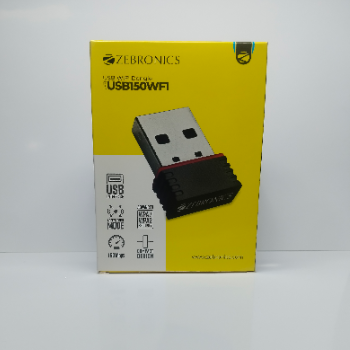
Zebro USB Wifi Dongle 150Mbps Compact Wireless Adapter
USB150WFI USB INTERFACE ACCESS POINT MODE ADVANCE WPA/WPA2 SECURITY 150 MBPS COMPACT DESIGN
₹499
Product Details
Zebro USB Wifi Dongle is a compact wireless adapter designed for laptops and desktops that need fast, stable Wi-Fi connectivity. With 150 Mbps speed, it’s ideal for browsing, streaming and everyday online work or casual gaming. The USB interface makes installation simple, while access point mode lets you share your connection with other devices easily. Advanced WPA/WPA2 security helps keep your network safe from unauthorized access and data leaks. This dongle is perfect for students, professionals and home users looking for an affordable, portable Wi-Fi solution. Its sleek, lightweight build makes it easy to carry in any bag or pocket, whether at home, office or travelling from Shop Number G16 Gauri Meadows 3 Near Besa Square.
Features & Benefits
150 Mbps speed for smooth browsing and streaming
Compact, lightweight design for easy portability
USB interface for quick plug-and-play setup
Access point mode to share internet wirelessly
Advanced WPA/WPA2 security protects your network
Ideal for desktops and laptops without built-in Wi-Fi
Compact, lightweight design for easy portability
USB interface for quick plug-and-play setup
Access point mode to share internet wirelessly
Advanced WPA/WPA2 security protects your network
Ideal for desktops and laptops without built-in Wi-Fi
How to Use
Plug the Zebro USB Wifi Dongle into an available USB port on your laptop or desktop. Install drivers if prompted, using the included CD or downloaded software. Connect to your preferred Wi-Fi network and enter the password. For access point mode, open the utility software, enable AP mode and follow on-screen steps.
Zebro USB Wifi Dongle is used to add wireless connectivity to desktops or laptops that don’t have built-in Wi-Fi, or to upgrade older Wi-Fi. It lets you connect to wireless networks, browse, stream and even create an access point to share your internet with other devices.
Yes, a USB Wi-Fi dongle gives your computer the ability to connect to wireless networks, similar to a built-in Wi-Fi card. When you plug in a zebro usb wifi dongle and install drivers, it detects nearby networks so you can connect to the internet without Ethernet cables.
The main disadvantages of a USB Wi-Fi dongle are reliance on USB ports and potential signal limitations compared to high-end internal adapters. If your USB port is blocked or damaged, performance may drop. Also, because it’s external, it can be accidentally bumped or removed from the port.
Yes, you can use the Zebro USB Wifi Dongle on any desktop with a free USB port. After plugging it in and installing drivers, your desktop will detect available Wi-Fi networks. This is a simple way to add wireless connectivity without opening the CPU cabinet or installing internal cards.
A 150 Mbps USB Wi-Fi dongle is sufficient for everyday internet use such as web browsing, HD video streaming, online classes and video calls. Actual speed depends on your broadband plan and router. For most home and small office users, 150 Mbps offers a stable and responsive experience.


 Select Date
 08:00 AM - 08:30 AM, Thursday, Nov 24, 2024
 Indian Standard Time
 Shahanab