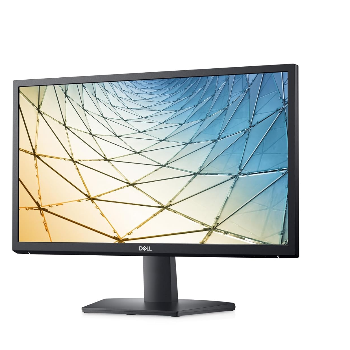
Dell Monitor Full HD Display Work & Study Screen

DELL MONITOR


₹ 8200 0% off
₹ 0

This Dell monitor is designed to deliver clear, sharp visuals for everyday use, whether you’re working from home, studying, or streaming your favourite content. Its sleek, modern design fits perfectly on any desk and enhances your workspace. Ideal for professionals, students and casual users, it helps reduce eye strain during long hours with comfortable viewing features. Easy connectivity options make it simple to plug in your laptop or PC. Whether you need a primary display or a second screen to boost productivity, this Dell monitor offers dependable quality and value, available at FIRST FLOOR 116 SHAYONA ARCADE BAPU NAGAR ROAD BAPUNAGAR AHMEDABAD AHMEDABAD GUJARAT SHAYONA ARCADE BAPU NAGAR ROAD BAPUNAGAR AHMEDABAD AHMEDABAD GUJARAT.

Full HD display for crisp, detailed visuals
Slim design saves space on any desk
Ideal for work, study and streaming
Comfortable viewing helps reduce eye strain
Easy connectivity with multiple input options
Reliable Dell build quality for daily use

Unbox the Dell monitor and place it on a stable, flat surface. Connect the stand securely as per the included guide. Plug the power cable into a socket and connect your PC or laptop using HDMI or VGA. Select the correct input source from the monitor menu and adjust brightness and tilt for comfortable viewing.

A Dell monitor is an excellent choice for everyday use because it offers reliable performance, clear visuals and durable build quality. Whether you’re browsing, working on documents, attending online classes or streaming videos, Dell monitors are designed to deliver consistent image quality, comfortable viewing and simple connectivity for daily tasks.

Yes, you can easily use this Dell monitor as a second screen to expand your workspace. Just connect it to your laptop or desktop via HDMI or VGA, then enable extended display in your system settings. A dual-monitor setup improves multitasking, making work, study and content creation more efficient and organised.

A Dell monitor is very suitable for working from home because it offers clear text, accurate colours and ergonomic viewing angles. The screen makes long hours of spreadsheets, emails and virtual meetings more comfortable. Its reliable performance and multiple connectivity options help you quickly create a professional, productive home office setup.

You can connect a Dell monitor to most laptops using HDMI, VGA or other compatible ports available on your devices. Simply plug in the cable, switch the monitor to the correct input and adjust your laptop’s display settings. This setup gives you a larger screen for work, study or entertainment.

This Dell monitor is well-suited for online classes because it provides a larger, clearer display than most laptops. Students can view presentations, notes and video calls more comfortably. The stable screen, sharp text and reliable connectivity help reduce eye strain and keep focus during long study or coaching sessions.