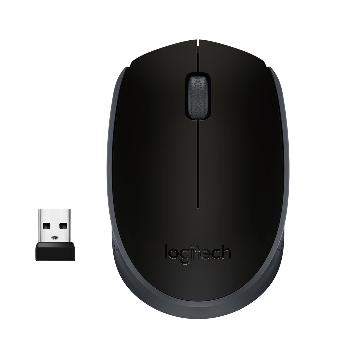
Logitech Wireless Mouse USB Precision Optical Mouse

USB MUSE SUPPRTED WINDOWS 710/11/


₹ 350 0% off
₹ 0

The Logitech wireless mouse is designed for comfortable, everyday use on laptops and desktops at work, home, or while travelling. With a reliable USB receiver, it offers stable wireless connectivity and smooth cursor control for browsing, documents, and light gaming. Compatible with popular Windows versions, it is ideal for students, professionals, and casual users who need hassle-free performance. Simply plug in the receiver and start using instantly, with no extra drivers required. Its compact, ergonomic shape fits most hands, reducing strain during long sessions. This product ships conveniently from FIRST FLOOR 116 SHAYONA ARCADE BAPU NAGAR ROAD BAPUNAGAR AHMEDABAD AHMEDABAD GUJARAT SHAYONA ARCADE BAPU NAGAR ROAD BAPUNAGAR AHMEDABAD AHMEDABAD GUJARAT for trusted service.

Reliable 2.4 GHz wireless for stable, lag-free control
USB plug-and-play, no software or drivers needed
Ergonomic design for all-day comfortable use
High-precision optical sensor for smooth tracking
Compact, lightweight body ideal for travel
Long-lasting battery reduces frequent replacements

Insert the battery into the mouse and close the cover. Plug the USB receiver into an available USB port on your computer or laptop. Turn on the mouse using the power switch if available. Wait a few seconds for automatic detection, then move and click to start using immediately.

Yes, this Logitech wirless mouse is designed to work seamlessly with major Windows versions, including Windows 7, Windows 10, and Windows 11. Simply plug the USB receiver into your PC or laptop, and the mouse will be automatically detected without needing additional driver downloads or complex setup steps.

To connect, insert the battery into the Logitech wireless mouse and ensure it is switched on. Then plug the USB receiver into an available USB port on your computer. Windows will automatically install basic drivers. Within a few seconds, the mouse should start working for normal movement and clicking.

For regular everyday use, the Logitech wirless mouse does not need special software. It is plug-and-play through the USB receiver, and standard drivers are handled by Windows. Optional Logitech software can be installed if you want advanced customization, but it is not required for basic scrolling and clicking.

Most Logitech wireless USB mice offer a reliable operating range of up to about 10 meters in open spaces. In typical home or office use, you can comfortably sit at your desk or nearby sofa without losing connection, as long as the USB receiver is within a clear line of sight.

Yes, the Logitech wirless mouse is ideal for laptop users on the move. Its compact size, lightweight design, and USB receiver make it easy to carry in a bag. Simply plug in the receiver wherever you work, and enjoy accurate cursor control without dealing with tangled wired mouse cables.