Maximizing Efficiency and Engagement with MAXHUB Interactive Panels: An Overview
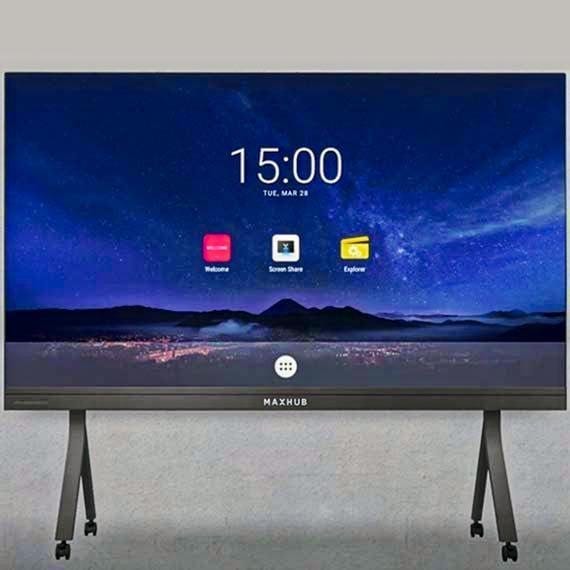
In today’s fast-paced digital era, the integration of advanced technology into educational and corporate environments is not just a luxury but a necessity. One such groundbreaking technology is the MAXHUB Interactive Panel, available on [Iconic Techno Vision](https://h-id.vyaparify.com/iconic-techno-vision/product/maxhub-interactive-panel). This interactive panel is designed to revolutionize the way we present, teach, and collaborate. In this blog, we will delve into the advantages of the MAXHUB Interactive Panel, provide helpful tips on how to get started, and discuss the essential equipment you need.
Advantages of MAXHUB Interactive Panels
1. Enhanced Collaboration and Engagement
The MAXHUB Interactive Panel transforms traditional meetings and classrooms into dynamic, interactive sessions. With multi-touch capabilities, participants can engage directly with the content, annotate in real-time, and collaborate seamlessly. This heightened level of interaction fosters better engagement, making learning and presentations more impactful.
2. High-Quality Display
The panel boasts a high-definition display with superior clarity and brightness. This ensures that visuals are crisp and colors are vivid, which is essential for both educational content and professional presentations. The anti-glare screen also enhances visibility, reducing eye strain during prolonged use.
3. Versatile Functionality
MAXHUB Interactive Panels come equipped with a plethora of features, including wireless screen sharing, video conferencing support, and built-in apps for note-taking and collaboration. This versatility makes it suitable for a variety of settings, from classrooms and lecture halls to corporate boardrooms and training centers.
4. User-Friendly Interface
The intuitive interface of the MAXHUB Interactive Panel is designed for ease of use. Even individuals who are not tech-savvy can quickly learn to navigate and utilize its features effectively. The touch gestures and on-screen controls are responsive and straightforward, enhancing the overall user experience.
5. Cost-Effective Solution
Investing in a MAXHUB Interactive Panel can be cost-effective in the long run. By consolidating various functionalities into a single device, it reduces the need for multiple pieces of equipment. This not only saves money but also simplifies setup and maintenance.
Getting Started with MAXHUB Interactive Panels
1. Unboxing and Setup
When you receive your MAXHUB Interactive Panel, begin by carefully unboxing the unit. Ensure you have all the components listed in the manual. Follow the setup instructions to mount the panel securely and connect it to a power source.
2. Initial Configuration
Power on the panel and follow the on-screen prompts to configure basic settings such as language, time zone, and network connections. Ensure that the panel is connected to your Wi-Fi or Ethernet network to enable wireless features and updates.
3. Familiarize with the Interface
Spend some time exploring the interface. Familiarize yourself with the home screen, navigation menus, and built-in applications. Take note of key features such as the annotation tools, screen sharing options, and video conferencing capabilities.
4. Install Necessary Apps
Depending on your specific needs, you may want to install additional apps. For educational purposes, apps like Google Classroom or Microsoft Teams can be beneficial. In a corporate setting, consider installing productivity tools like Zoom or Slack.
5. Conduct a Test Run
Before hosting a live session or presentation, conduct a test run. This allows you to ensure that all features are functioning correctly and helps you become more comfortable with the panel’s capabilities.
Essential Equipment for Optimal Use
1. Stylus Pens
For precise annotation and drawing, stylus pens are highly recommended. They provide better control and accuracy compared to using fingers.
2. Mounting Hardware
Depending on your setup, you may need additional mounting hardware such as wall mounts or mobile stands. Ensure that the hardware is compatible with the panel’s size and weight.
3. External Cameras and Microphones
For enhanced video conferencing, consider investing in high-quality external cameras and microphones. These peripherals can significantly improve audio and video clarity.
4. Wireless Presentation Devices
Devices like wireless presentation clickers can be handy during presentations, allowing you to navigate slides and control the panel remotely.
5. Protective Covers and Cleaners
To maintain the panel’s longevity, invest in protective covers and cleaning kits. Regular maintenance ensures that the screen remains in pristine condition and functions optimally.
Conclusion
The MAXHUB Interactive Panel is a powerful tool that can transform the way we communicate, collaborate, and learn. Its advanced features, user-friendly interface, and versatile functionality make it an invaluable asset in both educational and professional settings. By following the tips outlined above and equipping yourself with the necessary peripherals, you can maximize the benefits of this innovative technology. Explore the possibilities with MAXHUB Interactive Panels and take your presentations and collaborations to the next level.


 Select Date
Comments (0)