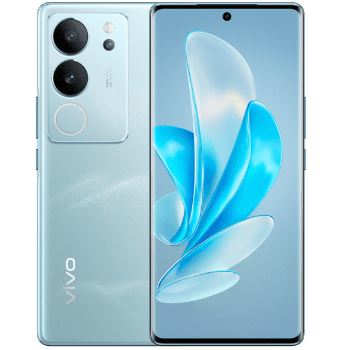
Vivo V29 in Sitapur - Enhance Your Experience
Experience the ultimate performance with the Vivo V29, designed to enhance your digital lifestyle.
₹33,000
Product Details
Discover the Vivo V29, now available at MAA Mobile and Electronics Shop in Sitapur. This sleek device combines performance with cutting-edge technology to keep you ahead. Enjoy a stunning display and powerful features, perfect for tech enthusiasts. Whether for work or play, the Vivo V29 offers seamless performance and exceptional user experience.
Features & Benefits
Stunning AMOLED display
High-speed processor
Long-lasting battery life
Advanced camera system
Sleek and modern design
High-speed processor
Long-lasting battery life
Advanced camera system
Sleek and modern design
How to Use
Keep your Vivo V29 running smoothly by regularly updating apps and software. Use a screen protector and case to safeguard against scratches and drops. Charge with the original charger for optimal battery health.
The Vivo V29 boasts a long-lasting battery that can support a full day of usage with normal activity, including streaming, browsing, and calls.
Yes, the Vivo V29 is equipped with 5G capabilities, allowing for faster internet speeds and enhanced network connectivity.
The Vivo V29 features an advanced camera system with high megapixels, offering crystal-clear photos and various shooting modes for every occasion.
Yes, the Vivo V29 supports expandable storage via a microSD card, allowing you to increase storage capacity as needed.


 Select Date
 08:00 AM - 08:30 AM, Thursday, Nov 24, 2024
 Indian Standard Time
 Shahanab