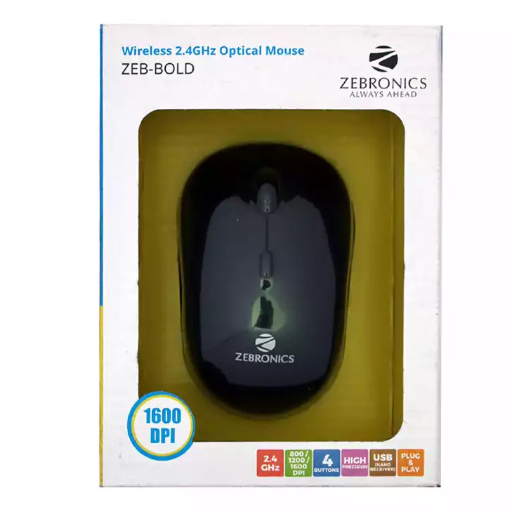
Zebronics bold wireless mouse
Upgrade your computing experience with the Zebronics Bold Wireless Mouse. Enjoy seamless connectivity and precision control for enhanced productivity.
₹349
Product Details
The Zebronics Bold Wireless Mouse is designed for optimal performance and comfort, making it a perfect choice for users looking to upgrade their computing setup. This wireless mouse offers a seamless connection to your device, ensuring smooth and precise cursor movement for enhanced productivity. With its ergonomic design and customizable features, the Zebronics Bold Wireless Mouse provides a comfortable grip and personalized control. Say goodbye to tangled cords and hello to seamless navigation with this high-quality wireless mouse.
Features & Benefits
- Wireless connectivity for hassle-free use
- Precise optical tracking for smooth cursor movement
- Ergonomic design for comfortable grip
- Customizable buttons for personalized control
- Long-lasting battery life for extended use
- Compatible with a wide range of devices
- Enhanced productivity through seamless connectivity and precise control
- Comfortable grip reduces strain during prolonged use
- Customizable features cater to individual preferences
- Wireless design promotes a clutter-free workspace
- Long-lasting battery ensures uninterrupted usage
- Versatile compatibility for use with various devices
- Precise optical tracking for smooth cursor movement
- Ergonomic design for comfortable grip
- Customizable buttons for personalized control
- Long-lasting battery life for extended use
- Compatible with a wide range of devices
- Enhanced productivity through seamless connectivity and precise control
- Comfortable grip reduces strain during prolonged use
- Customizable features cater to individual preferences
- Wireless design promotes a clutter-free workspace
- Long-lasting battery ensures uninterrupted usage
- Versatile compatibility for use with various devices
How to Use
- Remove the battery compartment cover and insert the batteries (if not pre-installed)
- Turn on the mouse using the power switch
- Connect the wireless receiver to your device's USB port
- Wait for the device to recognize the mouse and start using it
- For optimal performance, keep the mouse clean and free from dust build-up
- When not in use, turn off the mouse to conserve battery life
Keywords: Zebronics Bold Wireless Mouse, wireless mouse, ergonomic design, precise control, customizable features, seamless connectivity, productivity, comfort, battery life, compatibility.
- Turn on the mouse using the power switch
- Connect the wireless receiver to your device's USB port
- Wait for the device to recognize the mouse and start using it
- For optimal performance, keep the mouse clean and free from dust build-up
- When not in use, turn off the mouse to conserve battery life
Keywords: Zebronics Bold Wireless Mouse, wireless mouse, ergonomic design, precise control, customizable features, seamless connectivity, productivity, comfort, battery life, compatibility.


 Select Date
 08:00 AM - 08:30 AM, Thursday, Nov 24, 2024
 Indian Standard Time
 Shahanab