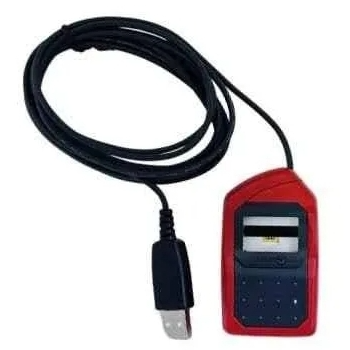
Morpho L0 / L1 Biometric Fingerprint Device
The Morpho L0/L1 Biometric Fingerprint Device ensures secure access through advanced fingerprint technology. Perfect for both personal and professional use, it is designed for fast and accurate authentication anywhere.
₹3,899
Product Details
Experience superior security with the Morpho L0/L1 Biometric Fingerprint Device. This device delivers fast fingerprint recognition, making it ideal for secure access in professional settings like AGAI KHATUL HOOGHLY West Bengal AGAI Kali Mandir. Its compact design makes it portable while ensuring unmatched accuracy in biometric identification.
Features & Benefits
- Fast and accurate fingerprint recognition.
- Compact design for easy portability.
- User-friendly setup process.
- Compatible with various operating systems.
- High-security access for sensitive environments.
How to Use
Connect the device to your computer. Install the necessary drivers. Enroll your fingerprint. Use your fingerprint for secure access. Check device performance regularly. Ensure proper cleaning of the sensor.
A Morpho device is a biometric fingerprint scanner used for secure authentication. It captures unique fingerprint patterns for identification purposes.
A Morpho one-time token is a temporary authentication code provided after fingerprint recognition, ensuring secure access for transactions or logins.
Morpho L0 and L1 are among the best devices. They offer high accuracy, speed, and user-friendly features, making them suitable for various security needs.
To unlock a Morpho device from Jio, ensure it's connected to the network, and follow the unlocking procedure outlined in the user manual for guidance.
To activate the Morpho biometric device, connect it to your laptop, install the driver, and follow the configuration steps for fingerprint enrollment in the software.


 Select Date
 08:00 AM - 08:30 AM, Thursday, Nov 24, 2024
 Indian Standard Time
 Shahanab