Dell Wireless Keyboard Seamless Typing Comfort

Elevate your typing experience with the Dell wireless keyboard, designed for seamless connectivity and optimal performance on the go.


₹ 1700 0% off
₹ 0

The Dell wireless keyboard is a sleek, cable-free solution designed for professionals, students, and casual users who need reliable performance every day. With responsive, low-profile keys, it delivers comfortable typing for long work or gaming sessions. This dell wireless keyboard for laptop or desktop reduces desk clutter and offers simple plug-and-play setup, so you can start typing in minutes with ease. It’s ideal for those upgrading from wired devices or creating a clean workspace at home or in the office. Built for stable wireless connectivity, it minimizes lag and dropouts for smoother input. Available from No.24 PID No.56-39-24 21st Main Road, BSK 2nd stage, Bengaluru, Karnataka, 560070, it keeps you productive wherever you work or study.
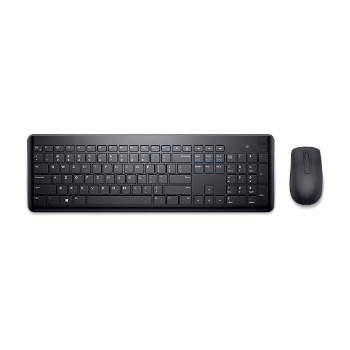
Stable wireless connection with minimal input lag
Full-size layout with comfortable, low-profile keys
Long battery life for fewer disruptions
Plug-and-play setup, no drivers required
Lightweight design for easy portability
Quiet keystrokes, ideal for shared workspaces

Insert the provided batteries into the keyboard. Plug the USB wireless receiver into your computer’s USB port or enable Bluetooth if supported by your model. Turn on the keyboard using the power switch. Wait a few seconds for automatic pairing. Test typing in any application and adjust system keyboard settings as needed.

Many Dell wireless keyboard models work with Mac as long as your Mac supports the required USB receiver or Bluetooth connection. Plug the receiver into a USB port or pair via Bluetooth, then select the correct keyboard layout in macOS settings. Some function keys may behave differently than on Apple keyboards.

Some Dell wireless keyboard models use Bluetooth, while others rely on a 2.4 GHz USB receiver. Check your model number: if it supports Bluetooth, you can pair it directly from your device’s Bluetooth settings. Non-Bluetooth models require the included USB dongle for a stable wireless connection to your computer.

Dell wireless keyboard price varies by model, features, and region. Basic standalone keyboards are usually more affordable than a dell wireless keyboard and mouse combo. Prices may differ from markets like India or the dell wireless keyboard price in Pakistan. Check current online listings and local retailers for the latest deals and offers.

To connect a Dell wireless keyboard with a USB receiver, insert the batteries, plug the receiver into a USB port, then turn on the keyboard. It should pair automatically within seconds. For Bluetooth models, enable Bluetooth on your device, select the keyboard from available devices, and confirm pairing when prompted on-screen.

A Dell wireless keyboard works by sending keystrokes via Bluetooth or a 2.4 GHz USB receiver instead of a cable. When you press a key, the signal travels wirelessly to your computer, which interprets the input instantly. This design reduces desk clutter while maintaining responsive, reliable performance for everyday typing tasks.