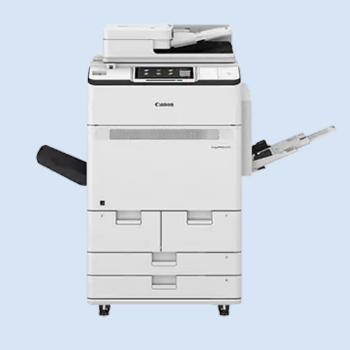
Canon imagePRESS C265 Colour Production Printer
The Canon imagePRESS C265 Colour Production Printer from PRINT AUTOMATION in Bengaluru is designed for vibrant colours and high-quality prints, featuring a resolution of 2400 x 2400 dpi, and capable of printing up to 70 pages per minute for black and white and 65 pages per minute for colour.
The Canon imagePRESS C265 is engineered for vibrant colour printing and exceptional quality, delivering a resolution of 2400 x 2400 dpi. It boasts impressive speeds of up to 70 pages per minute for black and white and 65 pages per minute for colour. Perfect for bustling work environments, this printer ensures every print stands out. Visit PRINT AUTOMATION in Bengaluru for this remarkable printing solution.
For those searching for the Canon imagePRESS C265 Colour Production Printer near me, PRINT AUTOMATION in Bengaluru offers this top-tier printer. Located conveniently within 5-20 km, it serves local businesses looking for high-quality printing solutions.
Product Details
Features & Benefits
- High-resolution printing at 2400 x 2400 dpi
- Impressive speeds of 70 ppm (B/W) and 65 ppm (Colour)
- Ideal for high-demand printing environments
- Advanced technology for reliability and efficiency
- Compact design suitable for various office spaces


 Select Date
 08:00 AM - 08:30 AM, Thursday, Nov 24, 2024
 Indian Standard Time
 Shahanab