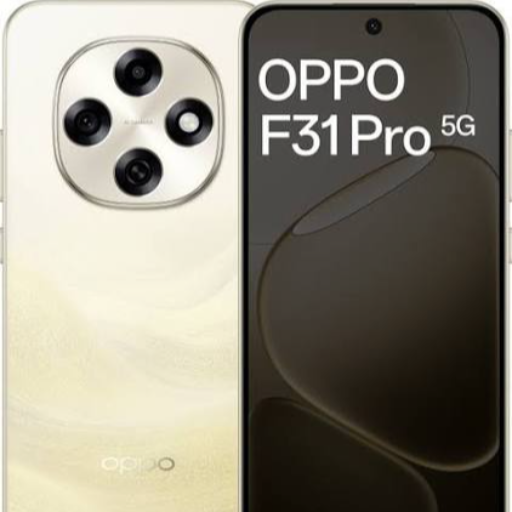
OPPO F31 PRO 12/256
The OPPO F31 PRO is a sleek and powerful smartphone that combines cutting-edge technology with stunning design, perfect for tech-savvy individuals looking for a premium mobile experience.
₹30,999
Product Details
The OPPO F31 PRO is a flagship smartphone that boasts a sleek and stylish design combined with top-of-the-line performance. With its advanced camera features, vibrant display, fast processor, and long-lasting battery life, this phone is designed to elevate your mobile experience to the next level. Whether you're a photography enthusiast, a social media influencer, or a multitasking professional, the OPPO F31 PRO offers unmatched versatility and performance. Stay connected, capture memories, and enjoy seamless multitasking with this premium smartphone.
Features & Benefits
- 6.4-inch AMOLED display with full HD resolution
- Quad camera setup with AI technology for stunning photography
- Octa-core processor for smooth and efficient performance
- Long-lasting battery with fast charging capabilities
- Sleek and premium design with a glass back
- ColorOS software for a seamless user experience
- Capture breathtaking photos and videos with the advanced camera features
- Enjoy immersive multimedia experiences on the vibrant AMOLED display
- Stay productive and efficient with the powerful octa-core processor
- Stay connected on-the-go with the long-lasting battery life
- Stand out with the stylish and premium design of the OPPO F31 PRO
- Experience a seamless and intuitive user interface with ColorOS
- Quad camera setup with AI technology for stunning photography
- Octa-core processor for smooth and efficient performance
- Long-lasting battery with fast charging capabilities
- Sleek and premium design with a glass back
- ColorOS software for a seamless user experience
- Capture breathtaking photos and videos with the advanced camera features
- Enjoy immersive multimedia experiences on the vibrant AMOLED display
- Stay productive and efficient with the powerful octa-core processor
- Stay connected on-the-go with the long-lasting battery life
- Stand out with the stylish and premium design of the OPPO F31 PRO
- Experience a seamless and intuitive user interface with ColorOS
How to Use
1. Power on the OPPO F31 PRO by pressing and holding the power button.
2. Set up your device by following the on-screen instructions for language, Wi-Fi, and Google account setup.
3. Customize your home screen, app layout, and settings according to your preferences.
4. Use the camera app to capture stunning photos or videos with the different camera modes and features.
5. Enjoy your favorite multimedia content on the vibrant AMOLED display.
6. Keep your device updated with the latest software updates for optimal performance and security.
Keywords: OPPO F31 PRO, smartphone, advanced camera, premium design, flagship, ColorOS, AI technology
2. Set up your device by following the on-screen instructions for language, Wi-Fi, and Google account setup.
3. Customize your home screen, app layout, and settings according to your preferences.
4. Use the camera app to capture stunning photos or videos with the different camera modes and features.
5. Enjoy your favorite multimedia content on the vibrant AMOLED display.
6. Keep your device updated with the latest software updates for optimal performance and security.
Keywords: OPPO F31 PRO, smartphone, advanced camera, premium design, flagship, ColorOS, AI technology


 Select Date
 08:00 AM - 08:30 AM, Thursday, Nov 24, 2024
 Indian Standard Time
 Shahanab