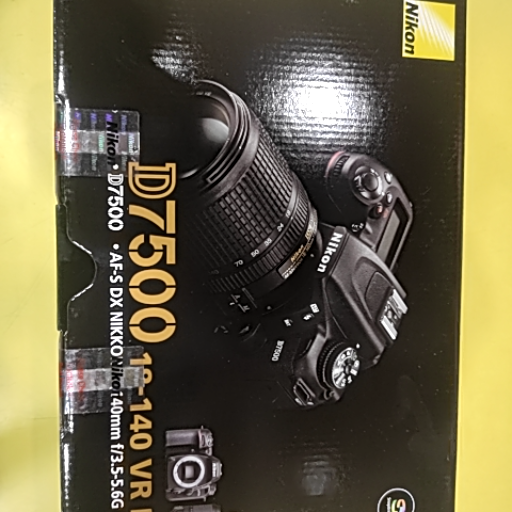
D7500 nikon camera
Elevate your photography game with the D7500 Nikon camera, capturing stunning images with incredible clarity and precision.
₹75,000
Product Details
The D7500 Nikon camera is a versatile and powerful tool designed for both amateurs and professionals alike. With its 20.9-megapixel DX-format sensor and EXPEED 5 image-processing engine, this camera delivers exceptional image quality and speed. The camera's 51-point autofocus system ensures sharp focus in any lighting conditions, while its 4K UHD video recording capabilities allow for high-resolution videography. Whether you're shooting portraits, landscapes, or action shots, the D7500 Nikon camera provides the performance and reliability you need to unleash your creativity.
Features & Benefits
- 20.9-megapixel DX-format sensor
- EXPEED 5 image-processing engine
- 51-point autofocus system
- 4K UHD video recording
- Tilting touchscreen LCD monitor
- Built-in Wi-Fi and Bluetooth connectivity
- Exceptional image quality and speed for stunning photography
- Versatile autofocus system for sharp and accurate focus
- High-resolution video recording for professional videography
- Convenient connectivity options for easy sharing and remote shooting
- Compact and lightweight design for portability and ease of use
- EXPEED 5 image-processing engine
- 51-point autofocus system
- 4K UHD video recording
- Tilting touchscreen LCD monitor
- Built-in Wi-Fi and Bluetooth connectivity
- Exceptional image quality and speed for stunning photography
- Versatile autofocus system for sharp and accurate focus
- High-resolution video recording for professional videography
- Convenient connectivity options for easy sharing and remote shooting
- Compact and lightweight design for portability and ease of use
How to Use
- Insert a fully charged battery and memory card into the camera.
- Turn on the camera by pressing the power button.
- Adjust settings such as ISO, aperture, and shutter speed to suit your shooting conditions.
- Frame your shot using the camera's viewfinder or tilting touchscreen LCD monitor.
- Press the shutter button halfway to focus, then fully to capture the image or video.
- Review and transfer your images wirelessly using the built-in Wi-Fi and Bluetooth connectivity.
- To ensure optimal performance, clean the lens and camera body regularly, and store the camera in a cool, dry place when not in use.
Keywords: D7500 Nikon camera, photography, image quality, autofocus system, 4K video recording, Wi-Fi connectivity, versatile.
- Turn on the camera by pressing the power button.
- Adjust settings such as ISO, aperture, and shutter speed to suit your shooting conditions.
- Frame your shot using the camera's viewfinder or tilting touchscreen LCD monitor.
- Press the shutter button halfway to focus, then fully to capture the image or video.
- Review and transfer your images wirelessly using the built-in Wi-Fi and Bluetooth connectivity.
- To ensure optimal performance, clean the lens and camera body regularly, and store the camera in a cool, dry place when not in use.
Keywords: D7500 Nikon camera, photography, image quality, autofocus system, 4K video recording, Wi-Fi connectivity, versatile.


 Select Date
 08:00 AM - 08:30 AM, Thursday, Nov 24, 2024
 Indian Standard Time
 Shahanab