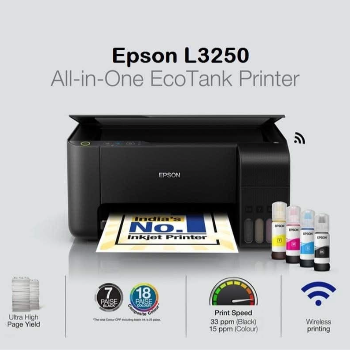
EPSON L3250 EcoTank All-in-One WiFi Printer
All in one printer
₹14,000
Product Details
The EPSON L3250 EcoTank is an all-in-one printer designed for home and small office users who need reliable printing, scanning and copying at ultra-low running costs. Its refillable ink tank system uses Epson L3250 ink bottles instead of cartridges, helping you save money on every page you print. Built-in WiFi enables easy wireless printing from laptops and mobiles, while high print resolution delivers sharp documents and vivid borderless photos. This epson l3250 printer is ideal for students, professionals and small businesses needing frequent color and black prints at scale. Available near 69 C 2 NEW PALLIPALAYAM ROAD NEAR SSM PRIMARY SCHOOL KUMARAPALAYAM NAMAKKAL TAMIL, it’s a smart choice for efficient, everyday printing needs.
Features & Benefits
EcoTank system cuts printing costs dramatically
Refillable bottles replace expensive cartridges
Wireless printing with built-in WiFi support
High-resolution prints for documents and photos
All-in-one print, scan and copy convenience
Ideal for home, student and small office use
Refillable bottles replace expensive cartridges
Wireless printing with built-in WiFi support
High-resolution prints for documents and photos
All-in-one print, scan and copy convenience
Ideal for home, student and small office use
How to Use
Unbox the EPSON L3250 and remove all protective materials. Fill each EcoTank with the correct Epson L3250 ink bottle. Connect the printer to power and turn it on. Install the Epson L3250 driver on your computer or mobile. Connect via USB or WiFi, then select the printer and start printing, scanning or copying as needed.
The default EPSON L3250 WiFi password is usually printed on a label on the printer or inside the setup sheet, often matching the serial number. When you run the Epson L3250 driver or setup utility, you can also view or change the WiFi Direct password for secure wireless printing from mobiles and laptops.
The Epson L3250 administrator password is typically set to a default value like “admin” when you first configure the printer’s web interface. If it has been changed and you’ve forgotten it, you may need to reset the EPSON L3250 printer to factory settings, then log in again and create a new secure admin password.
Epson L3250 ink is a set of genuine Epson EcoTank ink bottles designed specifically for the Epson EcoTank L3250. Instead of cartridges, the printer uses liquid ink tanks you refill. This keeps the Epson L3250 black ink price and color printing costs low, ideal for users needing high-volume, affordable printing at home or office.
To clean the Epson L3250 print head, ensure enough Epson L3250 ink in all tanks. On your computer, open the Epson L3250 driver utility, choose Maintenance, then select Head Cleaning. Follow on-screen steps and print a nozzle check. Repeat if lines are missing, but avoid excessive cleaning to reduce ink waste.
To reset the Epson L3250 printer, first turn it on. Press and hold the reset or network button (refer to the manual) for several seconds until indicators flash, initiating a network or factory reset. You may then need to reinstall the Epson L3250 driver and reconnect it to your WiFi or USB setup for normal use.


 Select Date
 08:00 AM - 08:30 AM, Thursday, Nov 24, 2024
 Indian Standard Time
 Shahanab